Shuttle Transport Software: Trip Logs, Settlements and Invoices in One Program
Web-based transport management software for companies that carry staff and students: routes and trips, student records and trip attendance, parent contracts and installment tracking, monthly trip log, customer and subcontractor settlements, vehicle and driver documents, payroll, income-expense and e-Invoice in one program. Prepare the invoice from the settlement with one click; VAT and any withholding you enable on the route are calculated automatically.
Try Transport Management Free for 14 Days
Enter your company name and your number of vehicles and routes; we will start your 14-day trial with a sample transport company set up for you.
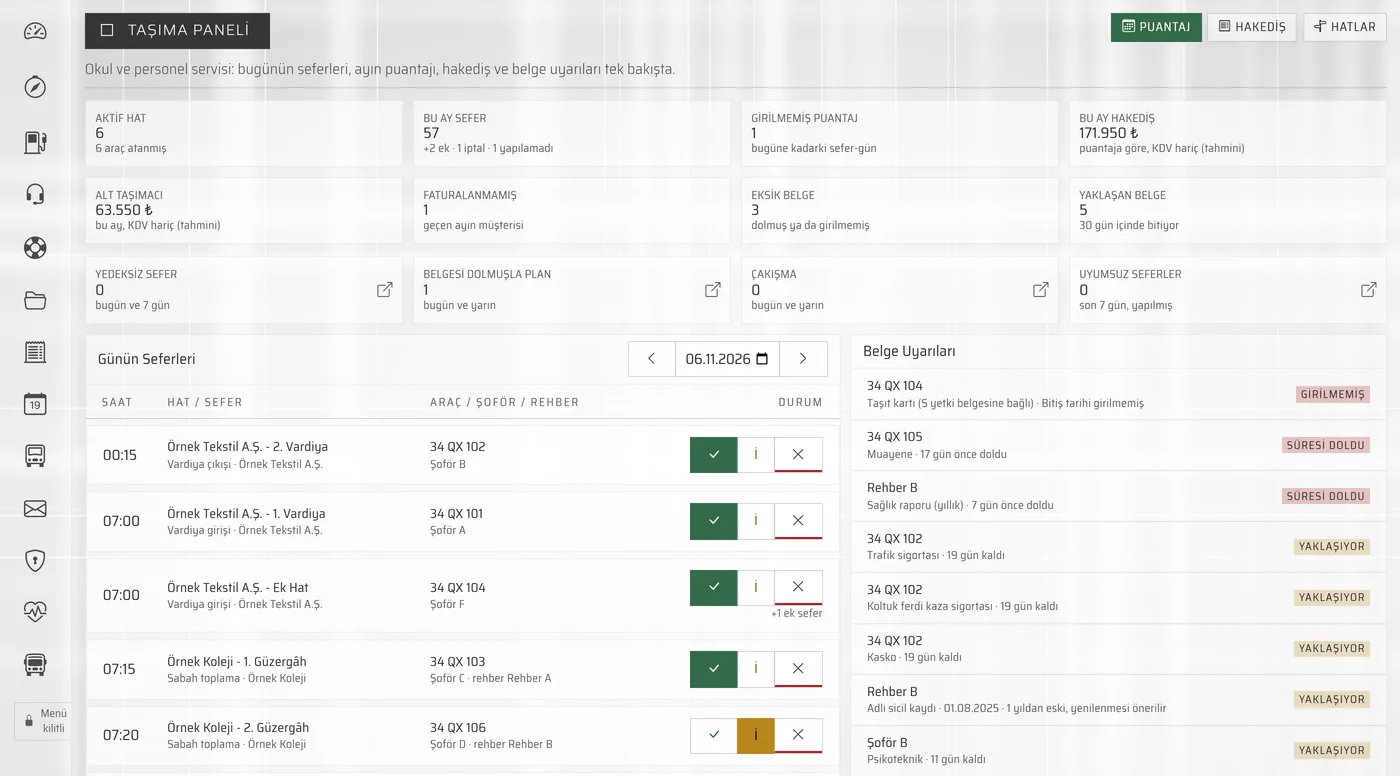
Who Is It For?
For carriers that provide regular shuttle services to organizations and calculate their settlements and invoices by hand every month.
Staff Shuttle Companies
Companies that transport employees of factories, organized industrial zones and businesses on morning, evening and shift trips. Each customer's monthly settlement is calculated separately.
School Shuttle Companies
School shuttle companies that work under contract with schools or collect fees from parents. Student records, trip attendance and parent contracts are in the same program. On routes paid by the school, the settlement and invoice go to the school with 10% VAT applied automatically; on routes paid by parents, invoice drafts are prepared for installments that fall due. On student routes, vehicle age, route permit and escort staff documents are also checked.
Companies Using Subcontracted Carriers
Companies that run some of their routes with their own vehicles and some with subcontracted carriers. Each subcontracted carrier's agreement, settlement and deductions are kept separately.
Month-End Calculations No Longer Take Days
Move your trip book, trip log sheet and settlement calculations into one program. The trip log you mark every day turns into the settlement and the invoice at month end.
Routes and Trips
Define your routes for each client company or school: morning, evening and shift trips, their times and operating days. You select the default vehicle and driver for each route once.
Monthly Trip Log
Mark each trip on the month-and-day grid: done, customer cancellation, failed or extra trip. Fill the month in one go based on operating days, and when the vehicle or driver changes, correct only that day.
Customer Settlement from the Trip Log
At month end, the settlement is calculated automatically from the trip log; the rate type can be per trip, per day or fixed monthly. Lines you add manually are kept when it is recalculated.
One-Click Invoicing
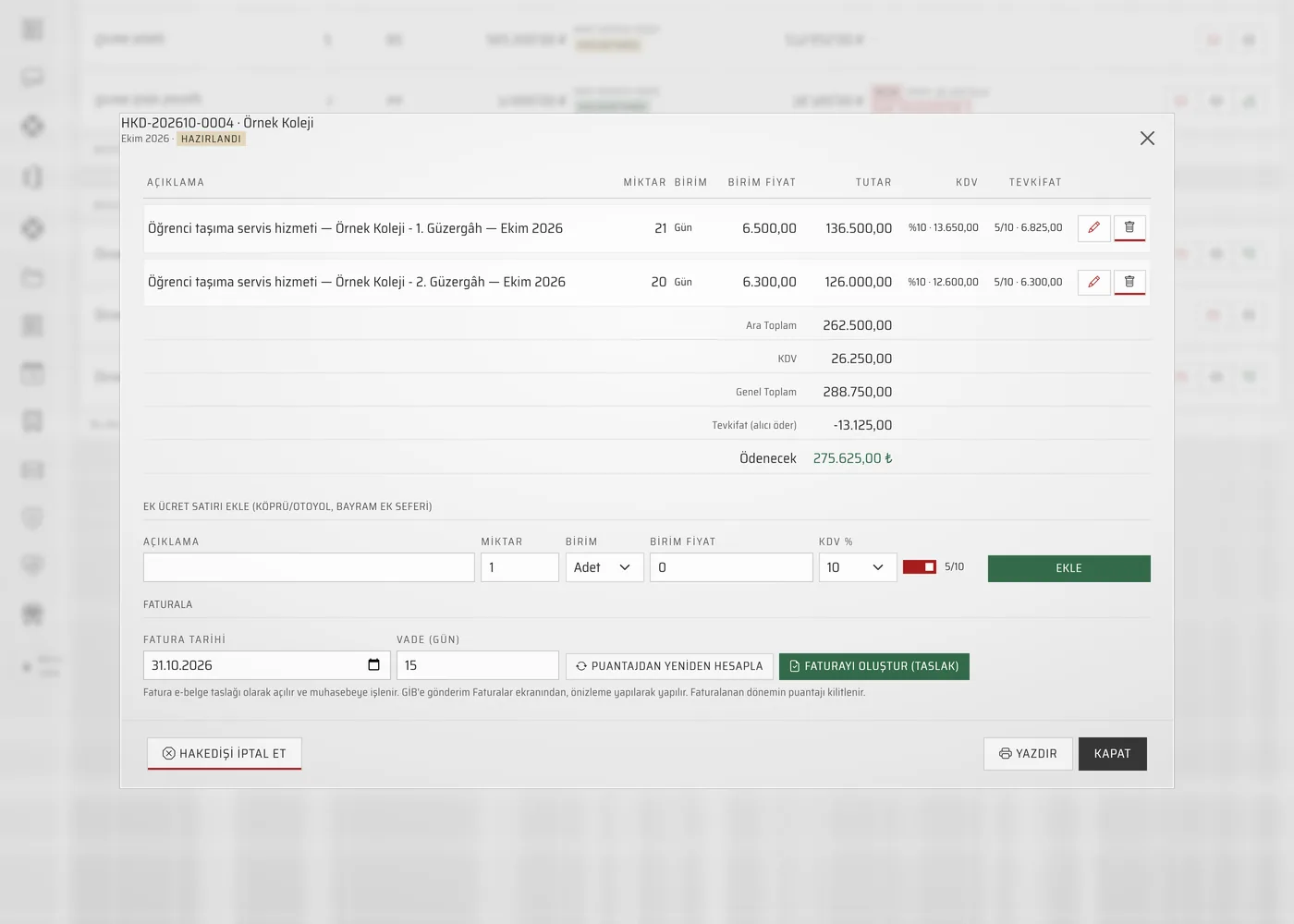
The invoice is prepared from the settlement in one click. VAT is applied automatically by service type (staff shuttles 20%, student shuttles 10%); if VAT withholding is enabled on the route, 5/10 withholding is reflected on the invoice. After a preview, you send it to GİB (the Turkish Revenue Administration) as an e-Invoice or e-Archive invoice.
Subcontractor Settlement
If you have assigned a route to a subcontracted carrier, calculate their settlement from the trip log at their unit price. Fuel advances, penalties, cash advances and other deductions are subtracted; the net amount payable and the reconciliation statement are ready.
Shuttle Vehicles
Each vehicle's class, seat count, model year and age, plate type, passenger accident insurance, vehicle card (tied to the S authorization certificate) and route permit are kept on a single card.
Driver Documents
Keep records of your drivers' licenses, SRC certificates, psychotechnical assessments, medical reports and criminal record certificates in one place, together with their dates.
List of Documents Nearing Expiry
Inspection, traffic and passenger accident insurance, comprehensive insurance, vehicle card, route permit, and driver and escort staff documents are gathered on the Document compliance screen; documents expiring within 30 days are shown in yellow.
Route & Vehicle Profitability
See revenue by customer, route and vehicle side by side with subcontracted carrier payments, fuel, vehicle expenses and the employer cost of driver and school bus escort payroll. Each route's gross profit is shown in figures.
Fuel Tracking and Vehicle Costs
Enter fuel and mileage for each vehicle, and consumption (l/100 km) is calculated automatically. Maintenance, repairs, tyres, insurance and fines are on one screen, with warnings for upcoming services and unpaid fines.
Driver Payroll and SGK
Your drivers' and staff's payroll and SGK (social security) hire and termination notices are in the same program.
Accounts, Cash and Bank
Every invoice issued is posted to the customer's account. You record collections and subcontracted carrier payments to cash or bank from the settlement screens; outstanding receivables are on a single list.
One Flow from Trip to Invoice
You don't enter each step into a separate spreadsheet. The route is defined once; the trip log, settlement, invoice and gross profit report are linked and work together.
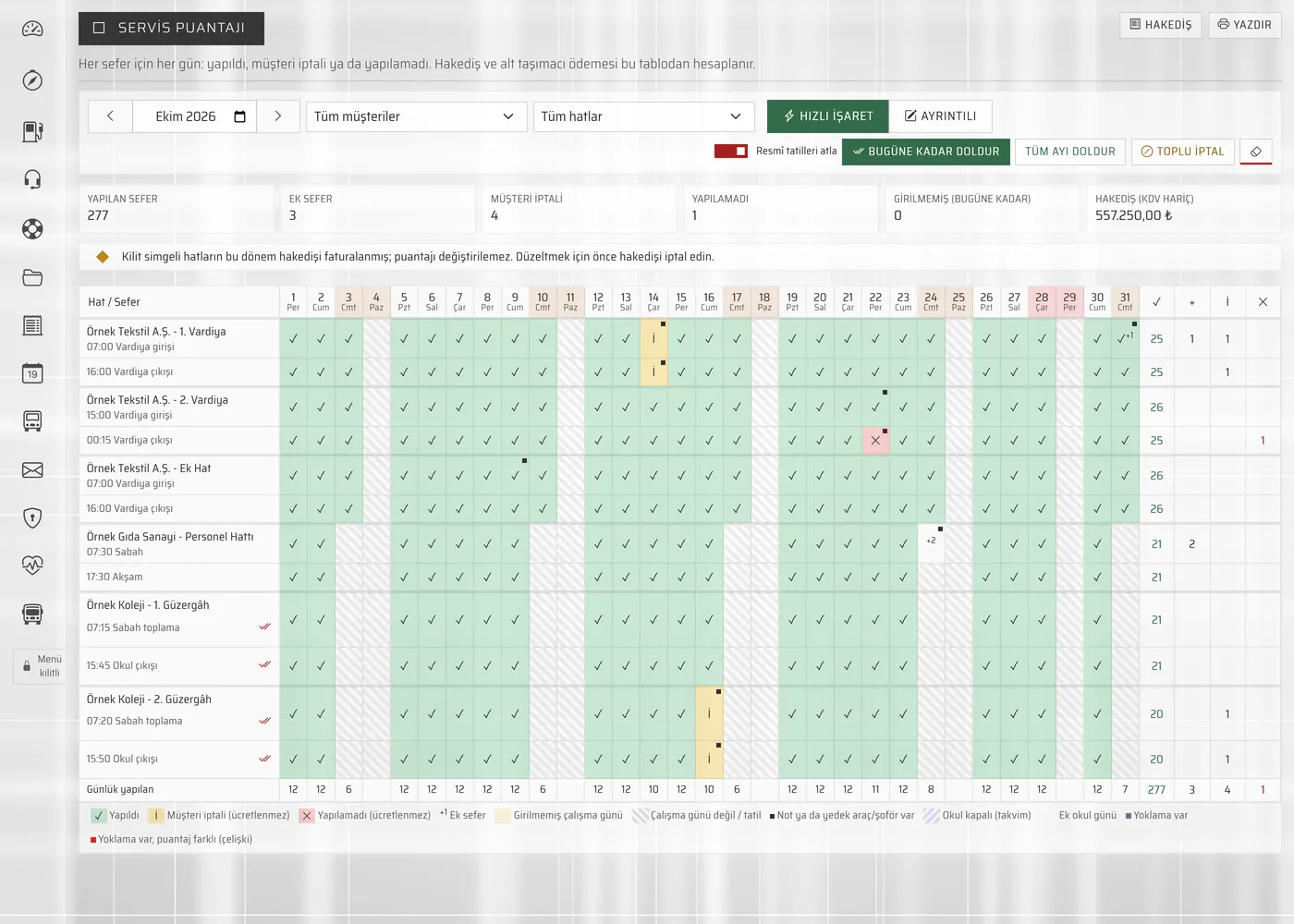
Trip Log Screen
Mark the trips of each route for every day of the month on a single grid; the settlement is calculated from this trip log.
- Quick Fill: Fill the month in one go based on the route's operating days.
- Changes Are Shown Separately: Customer cancellations, failed trips, extra trips and vehicle or driver changes are marked in that day's cell.
Settlement and Invoice
At month end, customer and subcontracted carrier settlements are calculated from the trip log; the invoice is prepared in one click.
- Customer Settlement: Settlement statement and draft invoice; VAT and the VAT withholding enabled in the route definition are applied automatically.
- Subcontractor Settlement: Net payment and reconciliation statement, with fuel advances, penalties and other deductions subtracted.
What's in the Program?
Transport Management runs inside İskay ERP: the route, trip log and settlement side is linked to accounting, payroll and e-invoicing in the same program.
Routes and Trips
- Route linked to the client company or school (customer account)
- Service type: staff or student
- Morning, evening and shift trips; times and operating days
- Default vehicle and driver
- Rate type: per trip, per day or fixed monthly
- Separate unit price for extra trips
Trip Log
- Month-and-day grid, trips per route
- Quick fill by operating days (public holidays can be skipped)
- Marks: done, customer cancellation, failed, extra trip
- Vehicle and driver changes by day
- Trip log lock for months that have been invoiced
- Printable trip log with signature fields for customer approval
Customer Settlement and Invoice
- Monthly settlement calculated from the trip log; manually added lines are kept
- Printable settlement statement
- One-click draft invoice from the settlement
- VAT: 20% for staff shuttles, 10% for student shuttles
- 5/10 VAT withholding applied to the invoice automatically
- Collections recorded to cash or bank from the settlement screen
Subcontractors and Settlement
- Subcontracted carrier and their unit price on the route
- Subcontracted carrier settlement from the trip log
- Deductions: fuel advance, penalties, cash advance and other
- Net amount payable and reconciliation statement
- Subcontractor agreement: who buys the fuel, contract period and expiry warning
- Deductions: payments made on the carrier's behalf (cash, bank, on credit at the fuel station) or a contract penalty
Shuttle Vehicles and Documents
- Vehicle class, seat count, model year and vehicle age
- Inspection, traffic insurance, passenger accident insurance and comprehensive insurance
- Vehicle card (tied to the S authorization certificate) and plate type
- Route permit
- Document status: valid, expiring, expired, not entered
- Own or subcontracted vehicle
Drivers and Escort Staff
- SRC and psychotechnical certificates
- Driver's license and expiry date
- Medical report and criminal record certificate
- Driver and escort age
- Document status: valid, expiring, expired, not entered
- School bus: education directorate training certificate and age limit checks
Reports and Profitability
- Revenue by customer
- Revenue by route
- Revenue by vehicle
- Subcontracted carrier payments, fuel, vehicle expenses, driver and school bus escort payroll
- Summary dashboard: today's trips (one-click marking), unentered trips, uninvoiced customers and documents nearing expiry
- Last 6 months comparison: revenue, invoiced amount and gross profit
Accounting, Payroll and e-Invoicing
- e-Invoice and e-Archive (NES Bilgi and QNB Finansbank integration)
- Current accounts, cash and bank
- Income and expense records
- Payroll and SGK
- Fuel tracking and vehicle costs (maintenance, repairs, tyres, insurance, fines)
- For invoices with VAT withholding, the account balance is tracked net of the withheld amount
Students, Attendance and Parents for School Shuttles
For companies with student routes, the school, student, trip attendance, parent contract and payment screens are part of İskay ERP; invoices for parent installments land on the Invoices screen of the same program.
Schools and Students
- School profile: class hours, delivery target, maximum travel time and escort requirement
- School calendar: holidays, half days, time changes and extra school days; copy to the next school year
- Student record: school, grade, address, special needs and notes
- Return handover rule: hand over to an adult or get off alone at the stop (with the parent's written consent on file)
- Service plan: the days a student uses the shuttle and exceptions; mid-year enrolment and leaving the service
Trip Attendance
- Pick the trip and day, then mark each student as boarded, did not board or delivered
- Start and finish a trip from the office
- Corrections on a finished trip require a reason; who changed what and when stays on record
- Information SMS according to the parent's preference (enabled in live use); if a wrong mark is undone within 60 seconds, no message is sent
Parent Contracts and Fares
- Contract by term, route and payer; net fee and up to 9 installments
- Route payment model: the school or the parent pays the fee
- The municipal fare ceiling is checked; exceeding it requires an approval with a reason
- Discounts, sibling discount suggestion, termination and rollover to the new school year
Parent Payments
- Draft invoices for installments that fall due; previewed on the Invoices screen and sent to GİB (Turkish Revenue Administration)
- Collections are applied to the oldest due invoice first; any excess becomes an advance
- Parents with overdue balances, payment notices, payment promises, advances and refunds
- Reminder SMS before the due date and when overdue (turned on in settings); service continues even if a payment is late
Stops and Employee Passengers
- Stop definitions; the stop order and times of a trip; a reverse-direction copy for the return trip
- Shifts, facilities and closed days for staff shuttles
- Employee passenger list: staff number, department, shift and route assignment; SMS preference